
Installieren der Web-Oberfläche
Die Web-Oberfläche ermöglicht es Händlern, Gutscheine direkt über den Internetbrowser einzulösen – ohne zusätzliche App zu installieren. Öffnen Sie dazu einfach den Zugang zum Gutscheinsystem auf Ihrem Smartphone, Tablet oder Windows-PC und melden Sie sich mit Ihren Zugangsdaten an. Nach der Anmeldung können Gutscheine über den QR-Code oder durch Eingabe des Gutschein-Codes aufgerufen und eingelöst werden. Für eine schnelle Nutzung empfiehlt es sich, eine Verknüpfung zur Web-Oberfläche auf dem Startbildschirm oder Desktop anzulegen. So ist das Einlöse-System jederzeit schnell erreichbar und kann direkt im Verkaufsalltag genutzt werden.
So richten Sie die Web-Oberfläche auf Ihrem Computer ein, um Gutscheine einzulösen und Guthaben zu verwalten.
Inhalte dieser Anleitung
Diese Anleitung zeigt die Installation der Web-Oberfläche sowie die ersten Schritte zur Nutzung auf Ihrem Gerät.
Schritt-für-Schritt-Anleitung
Hier finden Sie die einzelnen Schritte zur Installation und Einrichtung der Web-Oberfläche. Die Schritte sind auf dem Smartphone, dem Tablet oder dem Windows-PC identisch.
Download der Schritt-für-Schritt-Anleitung als PDF
Die Installationsanleitung steht zusätzlich als druckbare PDF-Version zur Verfügung.
F&As
Wenn etwas nicht wie erwartet funktioniert, finden Sie weitere Hinweise unter „Besondere Fälle & Hinweise“.
Schritt 1
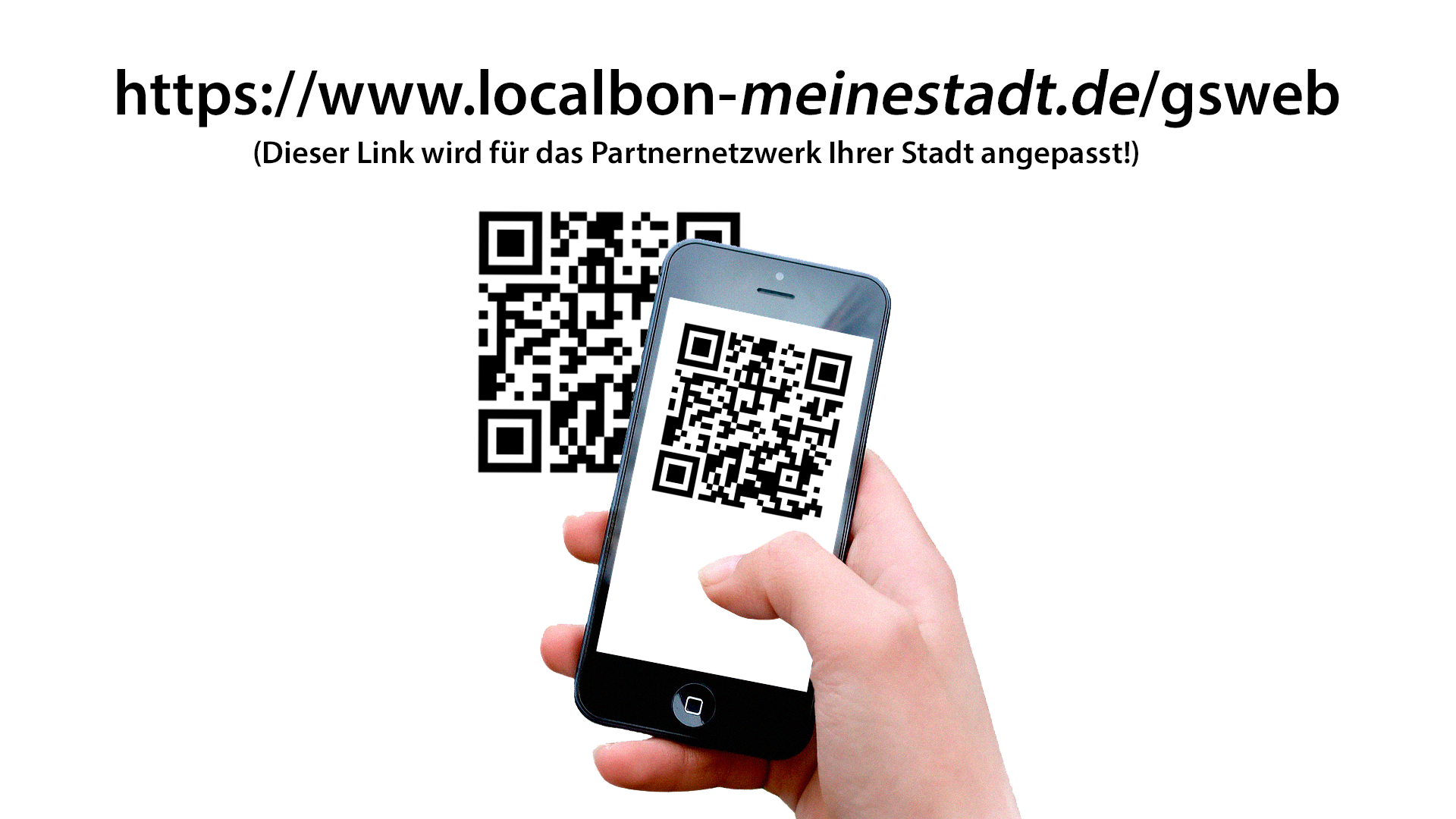
Zur Anmeldung und Einlösung von Gutscheinen über Smartphone, Tablet oder PC erhalten Sie mit Ihren persönlichen Anmeldedaten einen Link zum System, den Sie bitte in Ihrem Browser öffnen.
Mit dem Smartphone oder Tablet können Sie den schwarzen QR-Code zu diesem Link scannen.
Schritt 2
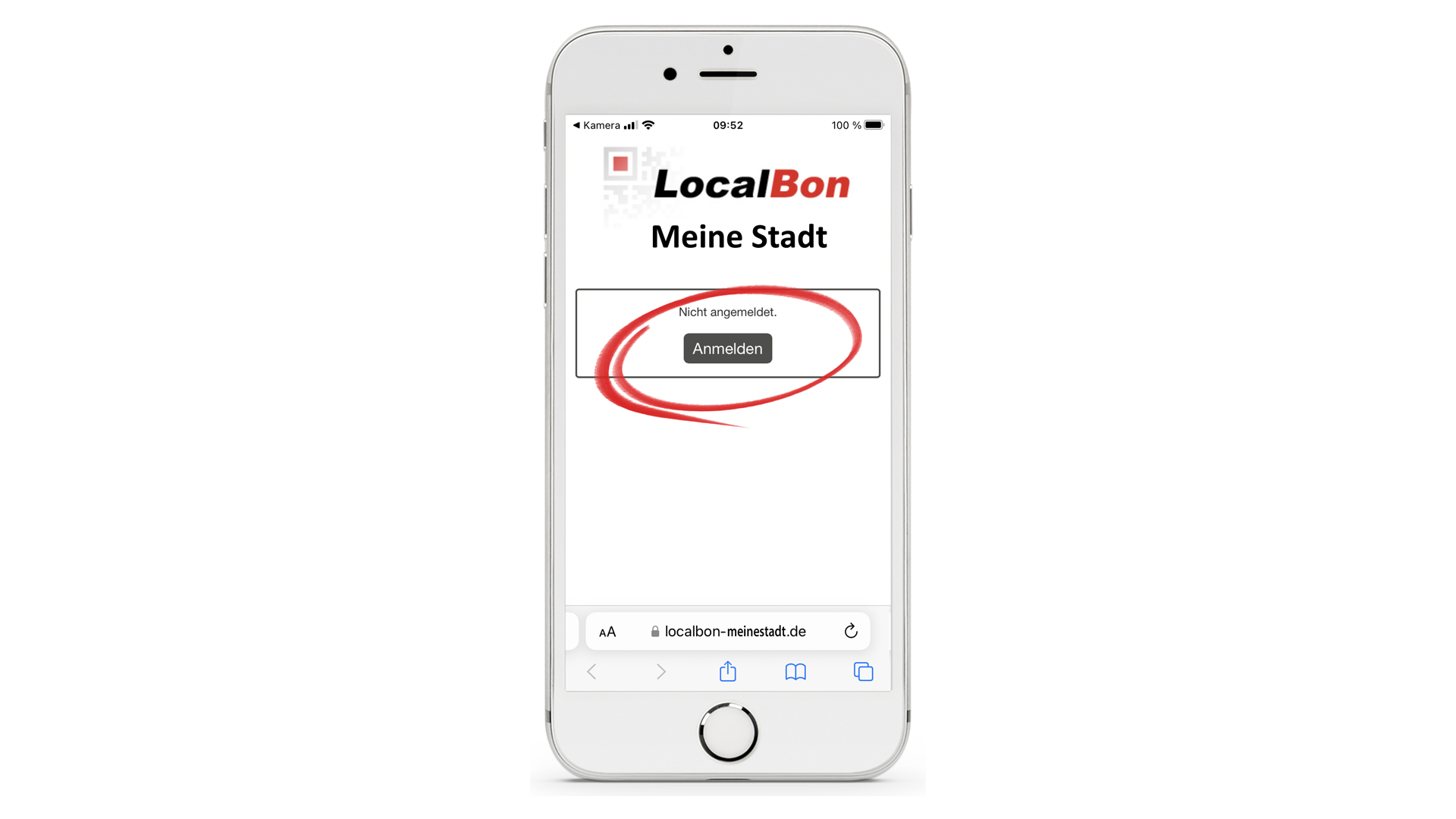
Nach dem Scannen des QR-Codes oder der Eingabe der URL zum System erscheint dieser Startbildschirm. Hier bitte den Button ‚Anmelden‘ antippen.
Alle diese Schritte sind bei der Installation auf dem PC analog.
Schritt 3
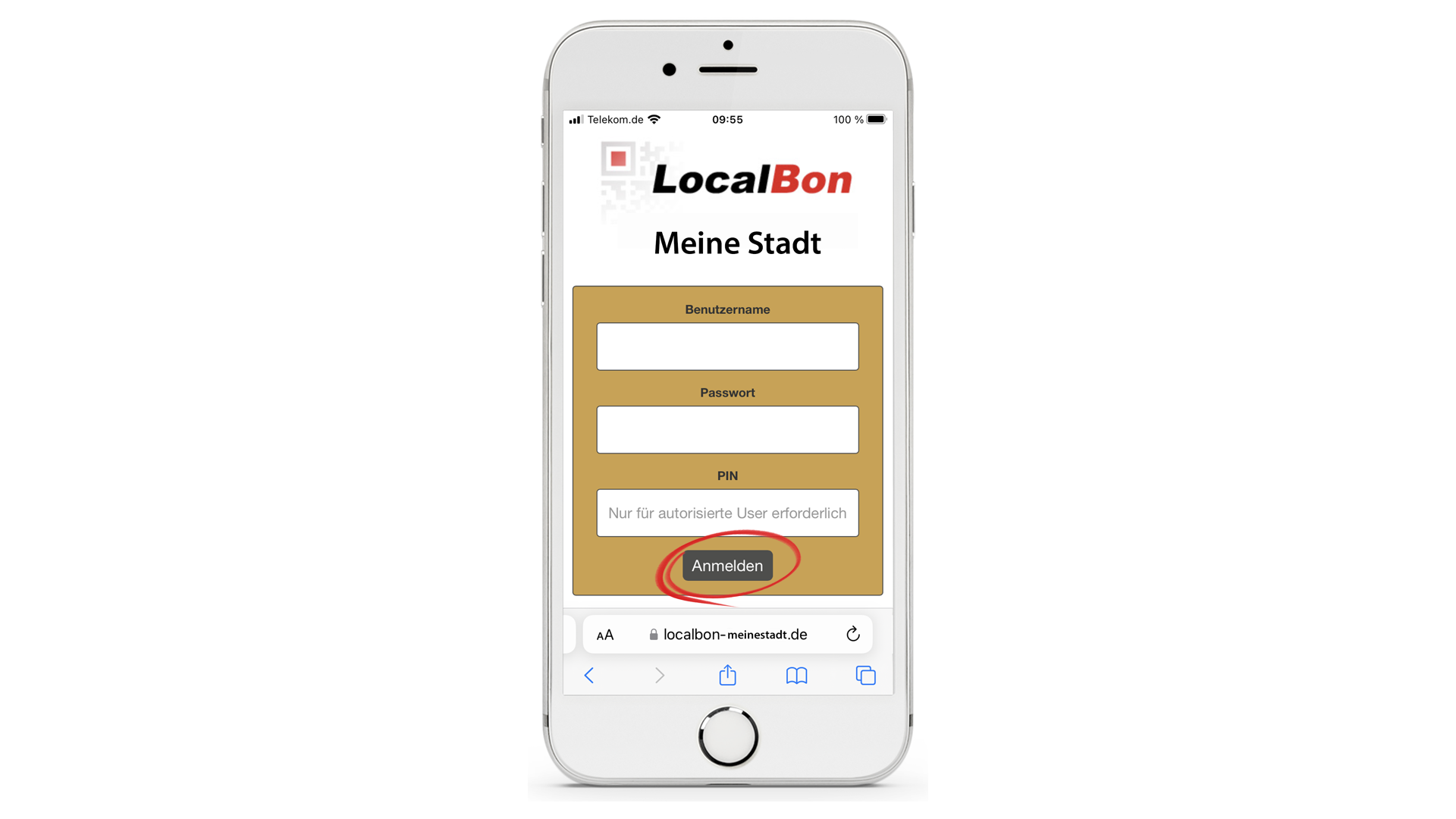
Jetzt hier Benutzername und Passwort eingeben und den Button ‚Anmelden‘ antippen.
Eine PIN ist nur einzugeben, wenn Sie autorisiert sind Gutscheine aufzuladen.
(gilt für Verkaufsstellen)
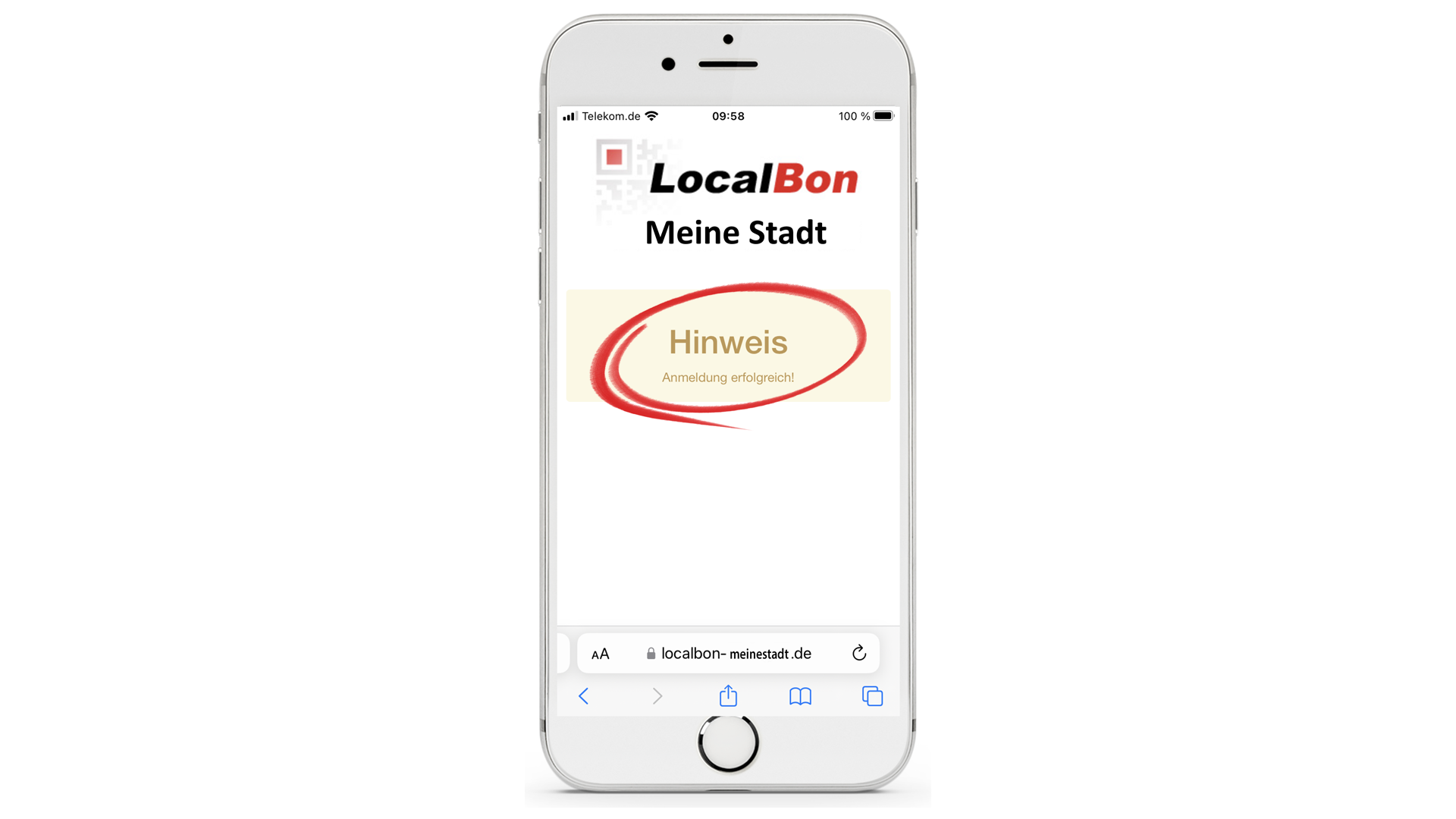
Fertig
Es erscheint nun ein Bestätigungsbildschirm der erfolgreichen Anmeldung.
„Die Anmeldung bleibt erhalten bis Sie sich abmelden oder der Browserverlauf gelöscht wird.“

Download der Schritt-für-Schritt-Anleitung als PDF zum Ausdrucken.
F&A rund um die Installation unserer Web-Oberfläche
Allgemeine Voraussetzungen
Ihr Titel
Your content goes here. Edit or remove this text inline or in the module Content settings. You can also style every aspect of this content in the module Design settings and even apply custom CSS to this text in the module Advanced settings.
Was benötige ich zur Nutzung der Web-Oberfläche?
Sie benötigen ein Smartphone, Tablet oder einen PC mit Internetverbindung sowie Ihre persönlichen Zugangsdaten (Benutzername und Passwort).
Eine PIN ist nur erforderlich, wenn Sie autorisiert sind Gutscheine aufzuladen.
Ihr Titel
Your content goes here. Edit or remove this text inline or in the module Content settings. You can also style every aspect of this content in the module Design settings and even apply custom CSS to this text in the module Advanced settings.
Wo finde ich den Link zur Web-Oberfläche?
Der individuelle Link wird Ihnen mit Ihren Zugangsdaten übermittelt und muss im Browser geöffnet werden.
Ihr Titel
Your content goes here. Edit or remove this text inline or in the module Content settings. You can also style every aspect of this content in the module Design settings and even apply custom CSS to this text in the module Advanced settings.
Kann ich die Web-Oberfläche auf jedem Gerät nutzen?
Ja. Die Nutzung ist auf Smartphone, Tablet und PC möglich, solange ein Browser und Internetzugang vorhanden sind.
Ihr Titel
Your content goes here. Edit or remove this text inline or in the module Content settings. You can also style every aspect of this content in the module Design settings and even apply custom CSS to this text in the module Advanced settings.
Muss ich eine Software installieren?
Nein. Die Web-Oberfläche läuft direkt im Browser Google Chrome. Es ist keine Installation erforderlich.
Allgemeine Voraussetzungen
Ihr Titel
Your content goes here. Edit or remove this text inline or in the module Content settings. You can also style every aspect of this content in the module Design settings and even apply custom CSS to this text in the module Advanced settings.
Wie melde ich mich an?
Öffnen Sie den Systemlink im Browser, klicken Sie auf „Anmelden“ und geben Sie Ihren Benutzernamen und Ihr Passwort ein.
Ihr Titel
Your content goes here. Edit or remove this text inline or in the module Content settings. You can also style every aspect of this content in the module Design settings and even apply custom CSS to this text in the module Advanced settings.
Wann muss ich eine PIN eingeben?
Eine PIN ist nur erforderlich, wenn Ihr Partnershop berechtigt ist, Gutscheine aufzuladen.
Ihr Titel
Your content goes here. Edit or remove this text inline or in the module Content settings. You can also style every aspect of this content in the module Design settings and even apply custom CSS to this text in the module Advanced settings.
Bleibe ich dauerhaft angemeldet?
Ja. Die Anmeldung bleibt bestehen, bis Sie sich abmelden oder der Browserverlauf gelöscht wird.
Ihr Titel
Your content goes here. Edit or remove this text inline or in the module Content settings. You can also style every aspect of this content in the module Design settings and even apply custom CSS to this text in the module Advanced settings.
Was passiert nach erfolgreicher Anmeldung?
Es erscheint eine Bestätigung der erfolgreichen Anmeldung, und Sie können Gutscheine einlösen oder verwalten.
Nutzung am Windows-PC
Ihr Titel
Your content goes here. Edit or remove this text inline or in the module Content settings. You can also style every aspect of this content in the module Design settings and even apply custom CSS to this text in the module Advanced settings.
Welcher Browser wird empfohlen?
Empfohlen wird ein aktueller Browser Google Chrome.
Ihr Titel
Your content goes here. Edit or remove this text inline or in the module Content settings. You can also style every aspect of this content in the module Design settings and even apply custom CSS to this text in the module Advanced settings.
Kann ich die Web-Oberfläche auch ohne Webcam nutzen?
Ja. Gutscheincodes können am PC manuell eingegeben werden.
Ihr Titel
Your content goes here. Edit or remove this text inline or in the module Content settings. You can also style every aspect of this content in the module Design settings and even apply custom CSS to this text in the module Advanced settings.
Kann ich einen Scanner verwenden?
Ja. Scanner, die QR-Codes oder Codes als Tastatureingabe übertragen, können genutzt werden.
Ihr Titel
Your content goes here. Edit or remove this text inline or in the module Content settings. You can also style every aspect of this content in the module Design settings and even apply custom CSS to this text in the module Advanced settings.
Kann ich die Web-Oberfläche auf mehreren PCs nutzen?
Ja. Sie können sich auf mehreren Geräten anmelden.
Typische Anmeldeprobleme
Ihr Titel
Your content goes here. Edit or remove this text inline or in the module Content settings. You can also style every aspect of this content in the module Design settings and even apply custom CSS to this text in the module Advanced settings.
Ich kann mich nicht anmelden. Was kann ich tun?
Prüfen Sie:
-
Benutzername und Passwort korrekt eingegeben
-
Internetverbindung aktiv
-
richtigen Systemlink verwendet
Ihr Titel
Your content goes here. Edit or remove this text inline or in the module Content settings. You can also style every aspect of this content in the module Design settings and even apply custom CSS to this text in the module Advanced settings.
Die Seite lädt nicht oder bleibt leer.
Versuchen Sie:
-
Seite neu laden
-
anderen Browser verwenden
-
Internetverbindung prüfen
Ihr Titel
Your content goes here. Edit or remove this text inline or in the module Content settings. You can also style every aspect of this content in the module Design settings and even apply custom CSS to this text in the module Advanced settings.
Ich habe mein Passwort vergessen.
Wenden Sie sich an Ihren Ansprechpartner, um neue Zugangsdaten zu erhalten.
Ihr Titel
Your content goes here. Edit or remove this text inline or in the module Content settings. You can also style every aspect of this content in the module Design settings and even apply custom CSS to this text in the module Advanced settings.
Ich sehe nur eine leere Seite nach der Anmeldung.
Versuchen Sie:
-
Browser neu starten
-
Cache löschen
-
anderen Browser verwenden
Browser- und Geräteprobleme
Ihr Titel
Your content goes here. Edit or remove this text inline or in the module Content settings. You can also style every aspect of this content in the module Design settings and even apply custom CSS to this text in the module Advanced settings.
Nach dem Löschen des Browserverlaufs bin ich abgemeldet.
Das ist normal. Sie müssen sich erneut anmelden.
Ihr Titel
Your content goes here. Edit or remove this text inline or in the module Content settings. You can also style every aspect of this content in the module Design settings and even apply custom CSS to this text in the module Advanced settings.
Die Anmeldung funktioniert auf einem Gerät, aber nicht auf einem anderen.
Prüfen Sie:
-
Internetverbindung
-
Browser-Version
-
korrekten Systemlink
Ihr Titel
Your content goes here. Edit or remove this text inline or in the module Content settings. You can also style every aspect of this content in the module Design settings and even apply custom CSS to this text in the module Advanced settings.
Kann ich die Web-Oberfläche dauerhaft geöffnet lassen?
Ja. Es wird empfohlen, dass Sie sich eine Vereknüpfung auf den Desktop legen. So lässt sich die Seite jederzeit mit einem Mausklick öffnen.
Sicherheit und Zugriff
Ihr Titel
Your content goes here. Edit or remove this text inline or in the module Content settings. You can also style every aspect of this content in the module Design settings and even apply custom CSS to this text in the module Advanced settings.
Warum ist eine Anmeldung erforderlich?
Die Anmeldung stellt sicher, dass alle Transaktionen dem richtigen Partnershop zugeordnet werden.
Ihr Titel
Your content goes here. Edit or remove this text inline or in the module Content settings. You can also style every aspect of this content in the module Design settings and even apply custom CSS to this text in the module Advanced settings.
Kann ein anderer Händler meine Zugangsdaten verwenden?
Nein. Jeder Partnershop hat individuelle Zugangsdaten. Sie sollten jedoch Ihre Zugangsdaten geschützt aufbewahren.
Ihr Titel
Your content goes here. Edit or remove this text inline or in the module Content settings. You can also style every aspect of this content in the module Design settings and even apply custom CSS to this text in the module Advanced settings.
Was passiert, wenn mehrere Mitarbeiter den gleichen Zugang verwenden?
Das ist möglich. Alle Transaktionen werden dem Partnershop zugeordnet.
Technische Sonderfälle
Ihr Titel
Your content goes here. Edit or remove this text inline or in the module Content settings. You can also style every aspect of this content in the module Design settings and even apply custom CSS to this text in the module Advanced settings.
Die Anmeldung funktioniert nach einem Windows-Update nicht mehr.
Versuchen Sie:
-
Browser aktualisieren
-
Browser neu starten
-
Cache löschen
- ggf. einfach neu anmelden
Ihr Titel
Your content goes here. Edit or remove this text inline or in the module Content settings. You can also style every aspect of this content in the module Design settings and even apply custom CSS to this text in the module Advanced settings.
Die Seite funktioniert in einem Browser, aber nicht in einem anderen.
Verwenden Sie einen aktuellen Standardbrowser wie Chrome.
Ihr Titel
Your content goes here. Edit or remove this text inline or in the module Content settings. You can also style every aspect of this content in the module Design settings and even apply custom CSS to this text in the module Advanced settings.
Die Seite wird durch das Firmennetzwerk blockiert.
In diesem Fall muss die IT-Abteilung den Zugriff auf die Systemdomain freigeben.
Weitere Anleitungen für Händler
Im Händlerbereich finden Sie weitere Anleitungen zur Nutzung des Gutscheinsystems.
Gutscheine über die Web-Oberfläche einlösen
So lösen Sie Gutscheine direkt im Browser ein, scannen QR-Codes oder geben Gutschein-Codes manuell ein.
→ Zur Anleitung „Gutscheine über die Web-Oberfläche einlösen“
Einlöse-App installieren
So installieren Sie die Einlöse-App auf Ihrem Smartphone und melden sich mit Ihren Zugangsdaten an.
→ Zur Anleitung „Einlöse-App installieren“
Gutscheine mit der Einlöse-App einlösen
So scannen Sie Gutscheine mit der App und lösen diese direkt an der Kasse ein.
→ Zur Anleitung „Gutscheine mit der Einlöse-App einlösen“
Zur Übersicht aller Händler-Anleitungen
Alle Anleitungen und Hilfethemen für Händler finden Sie gesammelt auf der Übersichtsseite des Support-Hubs.
→ Zur Seite „Support für Händler“