
Einlöse-App installieren
Die Einlöse-App ermöglicht es Händlern, Gutscheine schnell und einfach direkt an der Kasse zu scannen. Nach der Installation auf Ihrem Smartphone melden Sie sich mit Ihren Zugangsdaten im Gutscheinsystem an. Anschließend können Sie Gutscheine über den QR-Code erfassen und direkt einlösen. Das System zeigt dabei automatisch den aktuellen Gutscheinwert an. Je nach Einkauf kann der Gutschein vollständig oder nur teilweise eingelöst werden. Jede Einlösung wird im System gespeichert und kann später in den Einlöseberichten nachvollzogen werden. So behalten Sie jederzeit den Überblick über alle eingelösten Gutscheine und Buchungen.
Die Verwendung der Einlöse-App ist die beliebteste Methode zum Einlösen von Gutscheinen. Sie kann auf Smartphones oder Tablets sowie auf Desktop-PCs eingesetzt werden.
Installation der Einlöse-App
Hier finden Sie Anleitungen zur Installation der Einlöse-App.
Video
Das Video zeigt die vollständige Installation der Einlöse-App Schritt für Schritt.
Schritt-für-Schritt-Anleitung
Hier finden Sie die einzelnen Installationsschritte kompakt und nachvollziehbar beschrieben.
Download der Anleitung als PDF
Die Installationsanleitung steht zusätzlich als druckbare PDF-Version zur Verfügung.
F&As
Wenn etwas nicht wie erwartet funktioniert, finden Sie weitere Hinweise unter „Besondere Fälle & Hinweise“. >hier
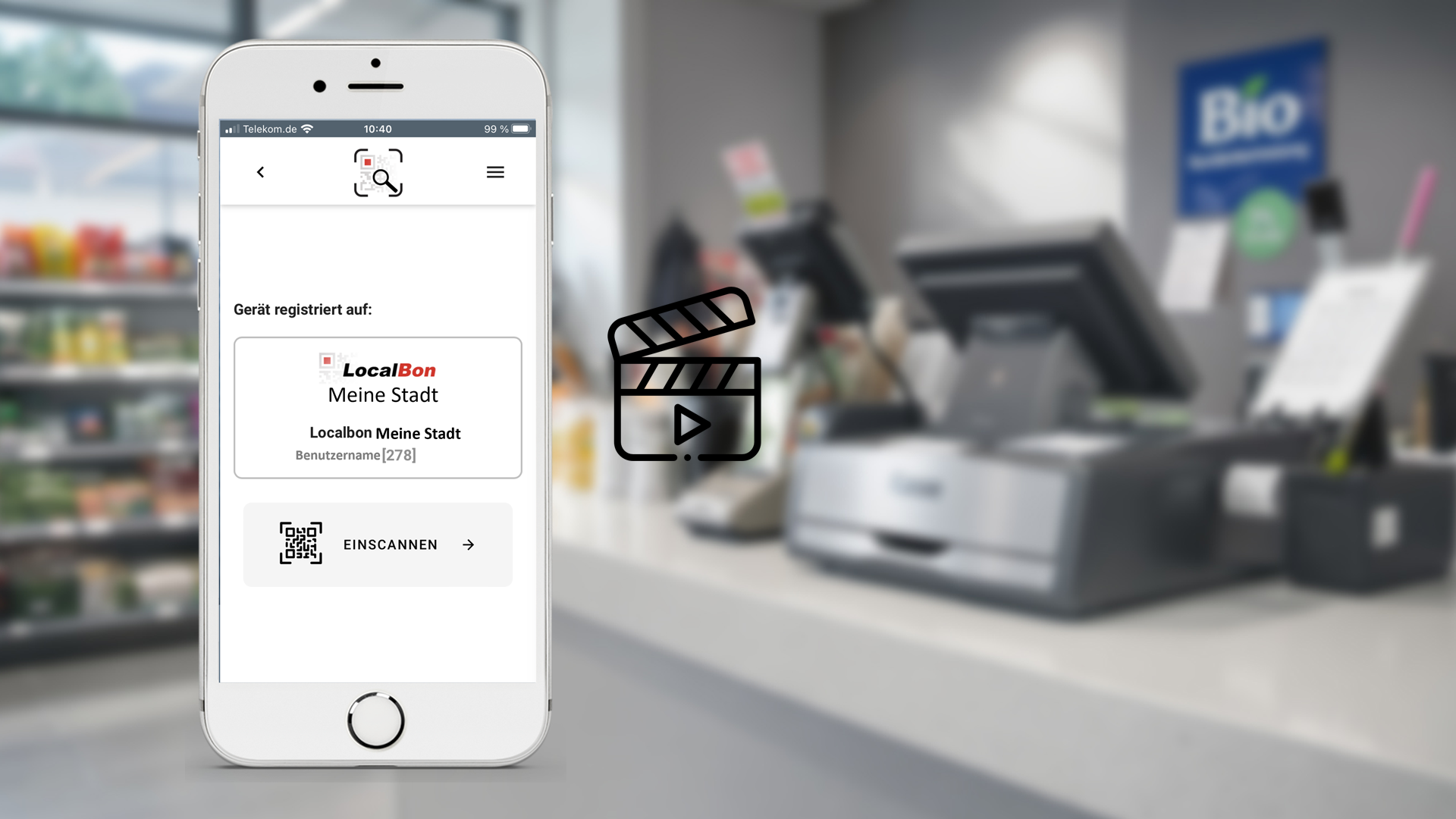
Video: Einlöse-App installieren
In diesem Video sehen Sie die Installation der Einlöse-App Schritt für Schritt – vom Download bis zur ersten Nutzung.
Der gesamte Vorgang dauert in der Regel nur wenige Minuten.
Schritt-für-Schritt-Anleitung
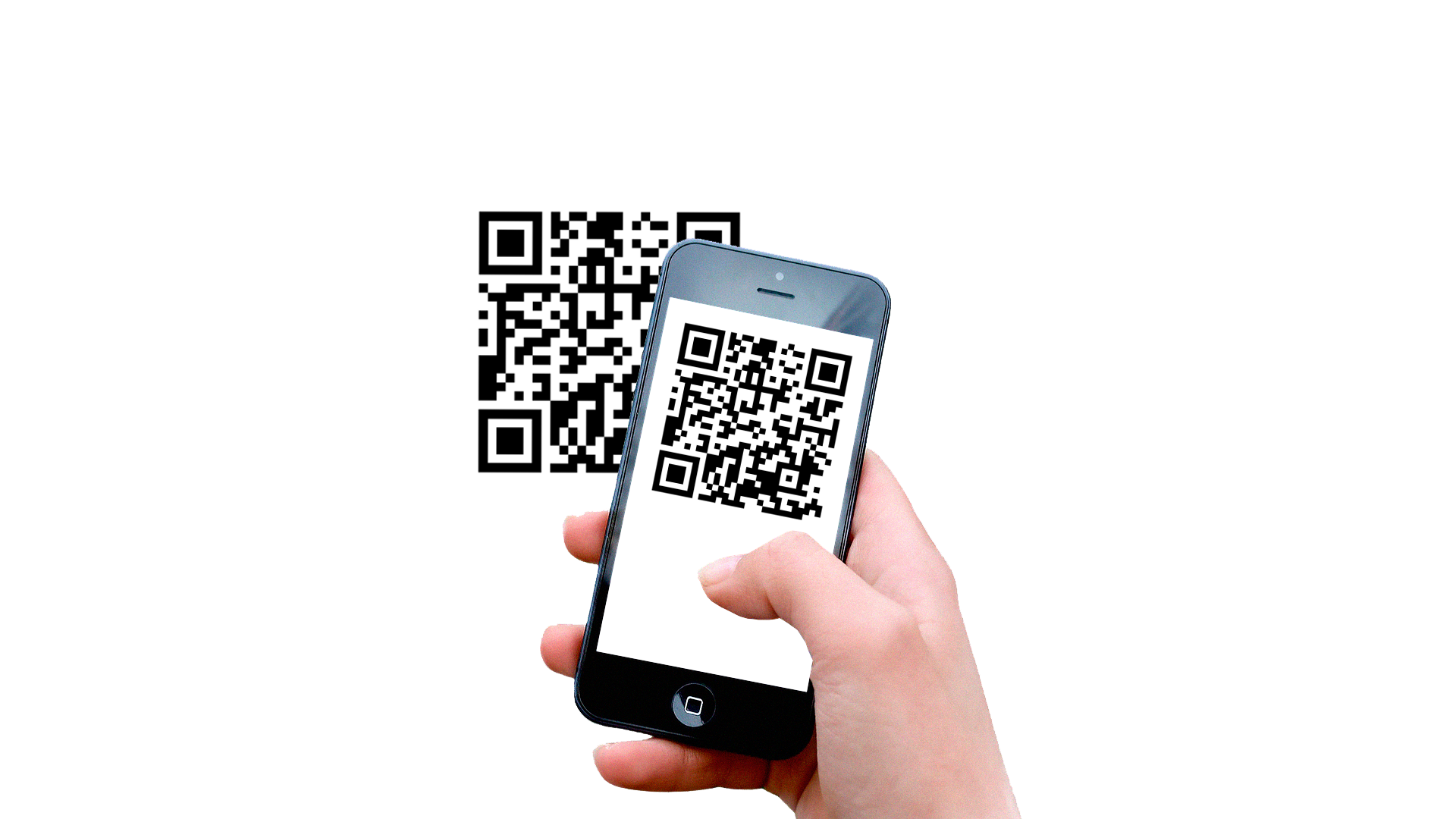
Web-App öffnen Schritt 1
Zum Öffnen der App mit dem Smartphone oder Tablet einfach den schwarzen QR-Code scannen oder
den Link: https://partner.localbon-app.de öffnen.
Die LocalBon-Einlöse-App wird als PWA bereitgestellt und muss nicht aus einem App-Store heruntergeladen werden!
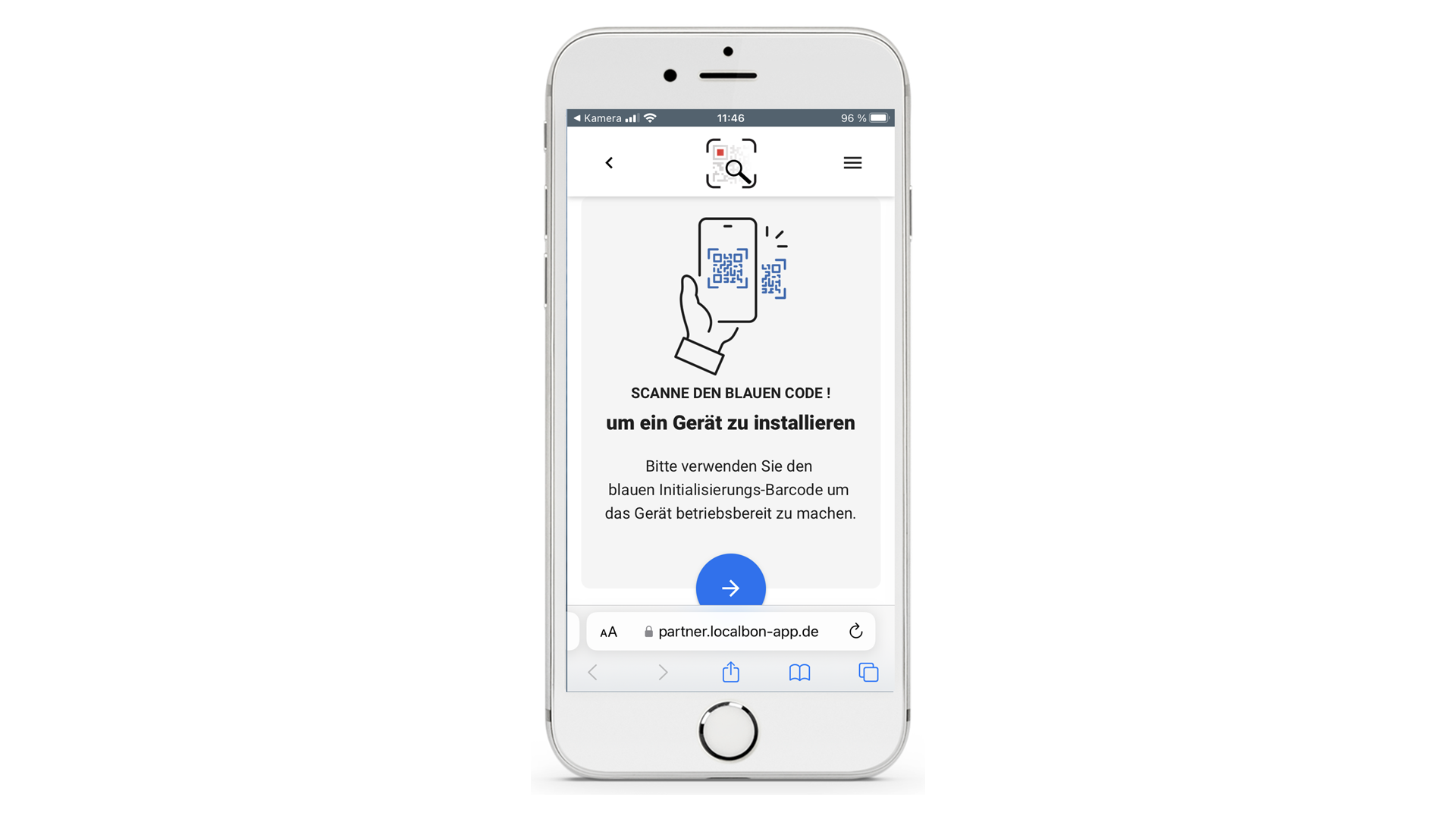
Installation Schritt 2
Nach dem Öffnen des Links erscheint dieser Bildschirm*
*hier Ansicht iPhone
Jetzt bitte vor der Initialisierung mit dem blauen QR-Code die PWA auf dem Homescreen installieren!
Zum Home-Bildschirm Schritt 3
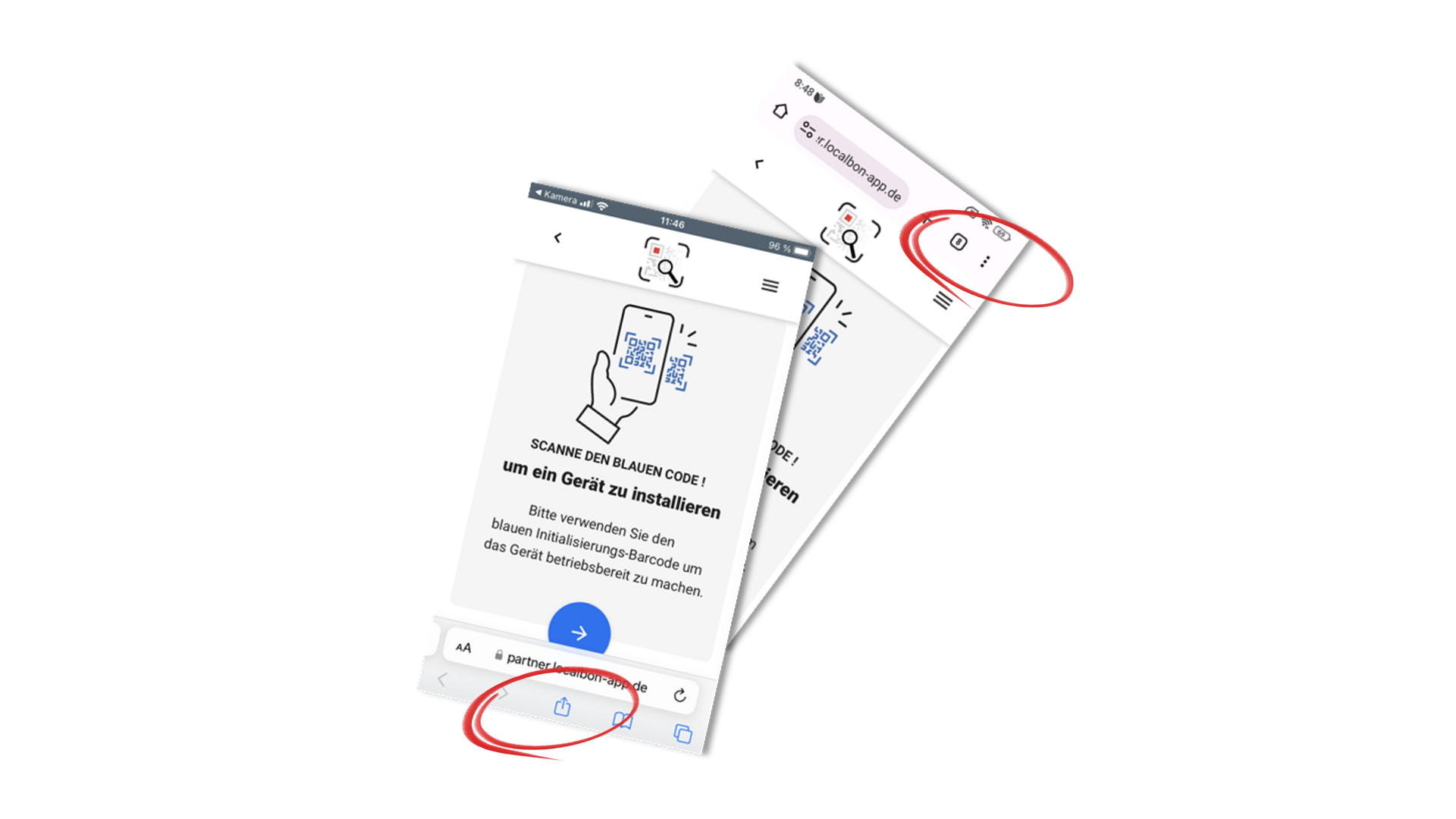
Mit den iPhone unten auf den Teilen-Button drücken.
Mit einem Android-Gerät auf die drei Punkte oben rechts tippen.
Es erscheint ein Erweiterungs-Menü.
Darin scrollen und die Option Zum Home-Bildschirm wählen.
In vielen Fällen wird sogar direkt ein Pop-up-Fenster zur Installation der PWA angeboten.
Je nach Gerät oder Betriebssystem-Version kann es zu abweichenden Darstellungen kommen. Bei Bedarf bietet eine Google-Suche individuelle Hilfestellung.
Zum PC-Home-Bildschirm Schritt 3a
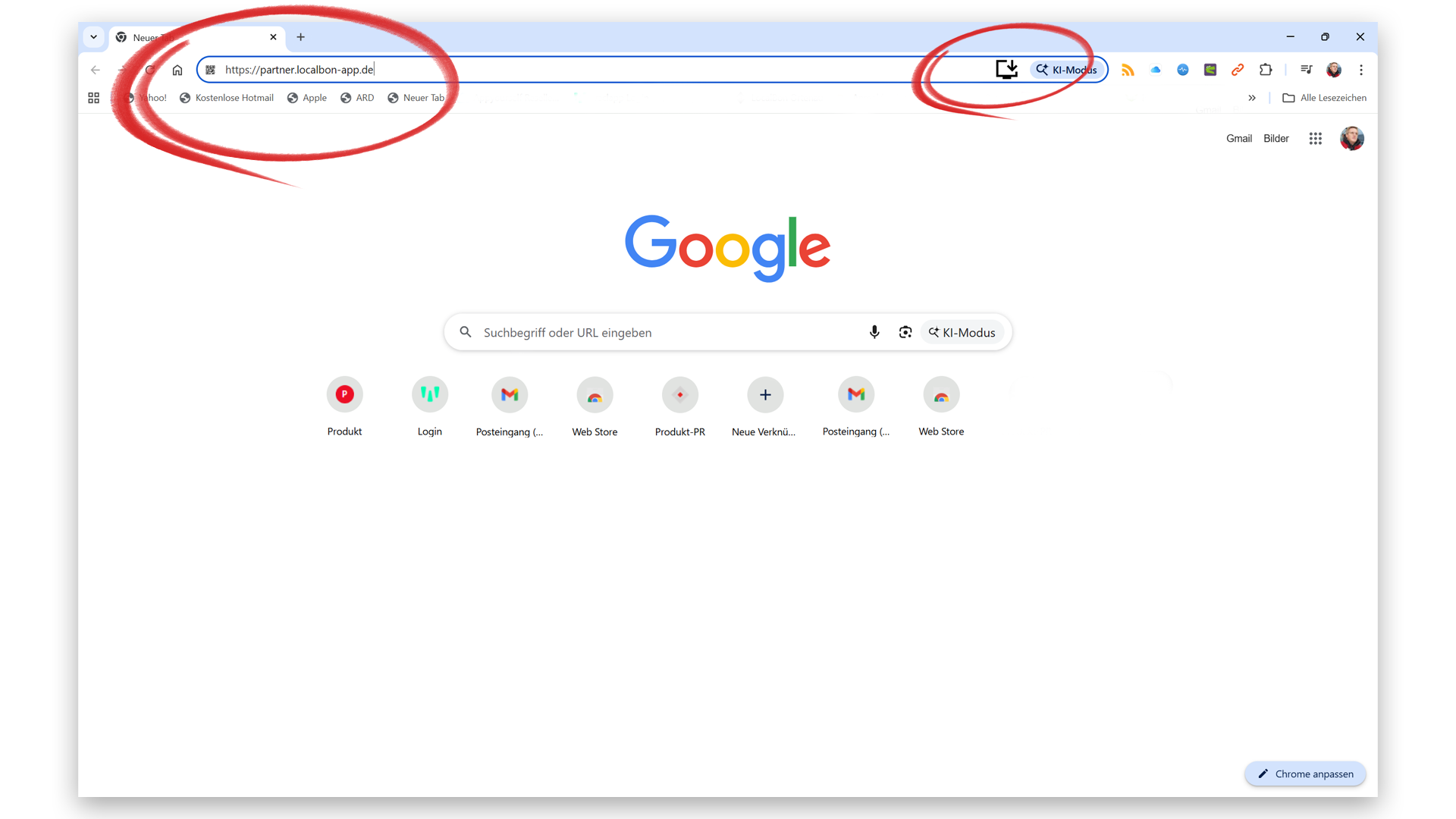
Um die Einlöse-App auf dem PC zu installieren zuerst in Google Chrome den Link: https://partner.localbon-app.de in die Browserleiste eingeben und die PWA öffnen. Nach dem Öffnen der PWA hinten in der Adressleiste den Installieren-Button drücken, um die App mit dem App-Icon auf dem Homescreen abzulegen.
In vielen Fällen wird sogar direkt ein Pop-up-Fenster zur Installation der PWA angeboten.
Alle anderen Schritte erfolgen analog der Installation auf dem Smartphone oder Tablet.
Einlöse-App öffnen Schritt 4
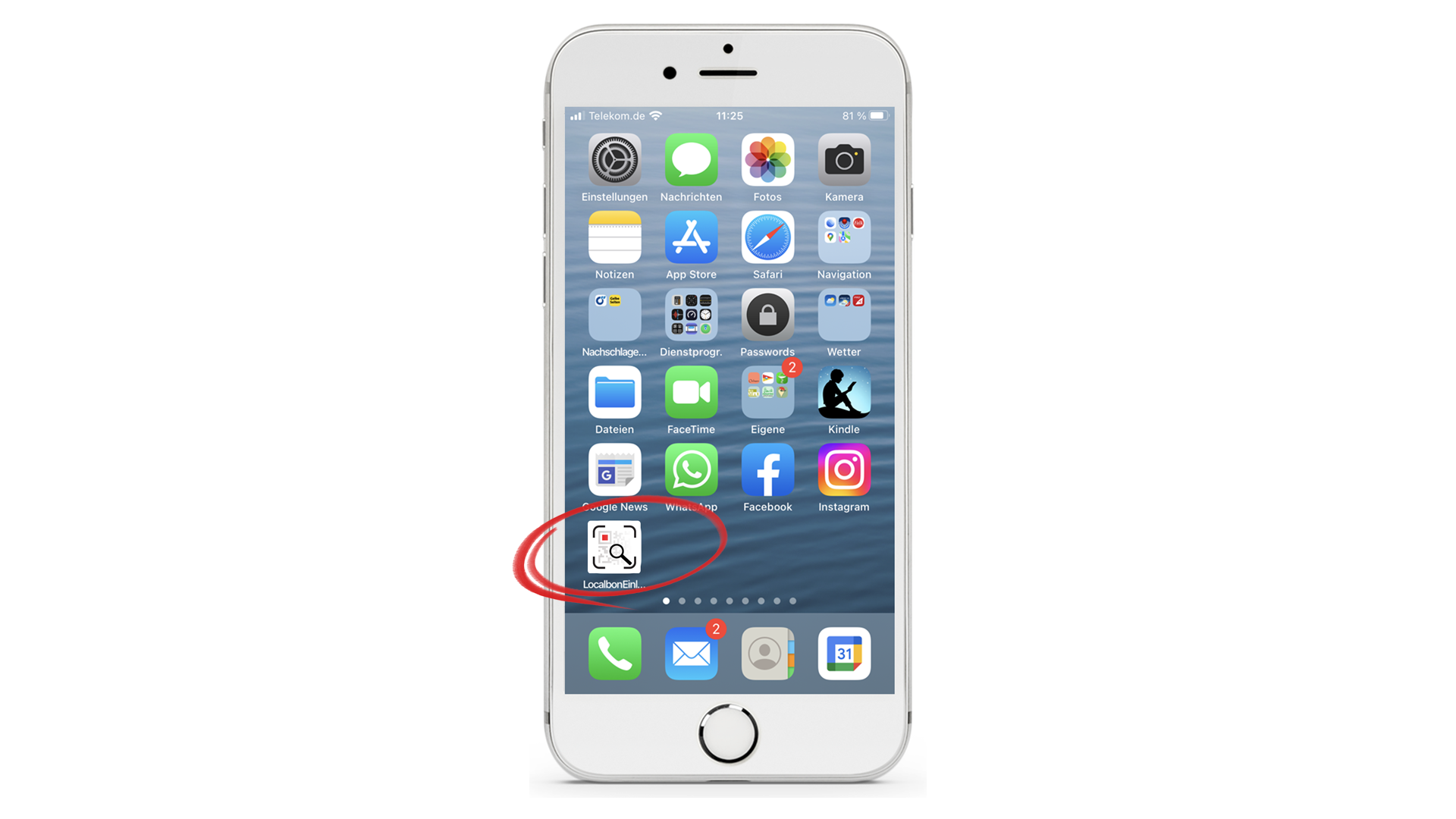
Jetzt die Einlöse-App über den Button auf dem Homescreen öffnen.
Initialisierung Schritt 5
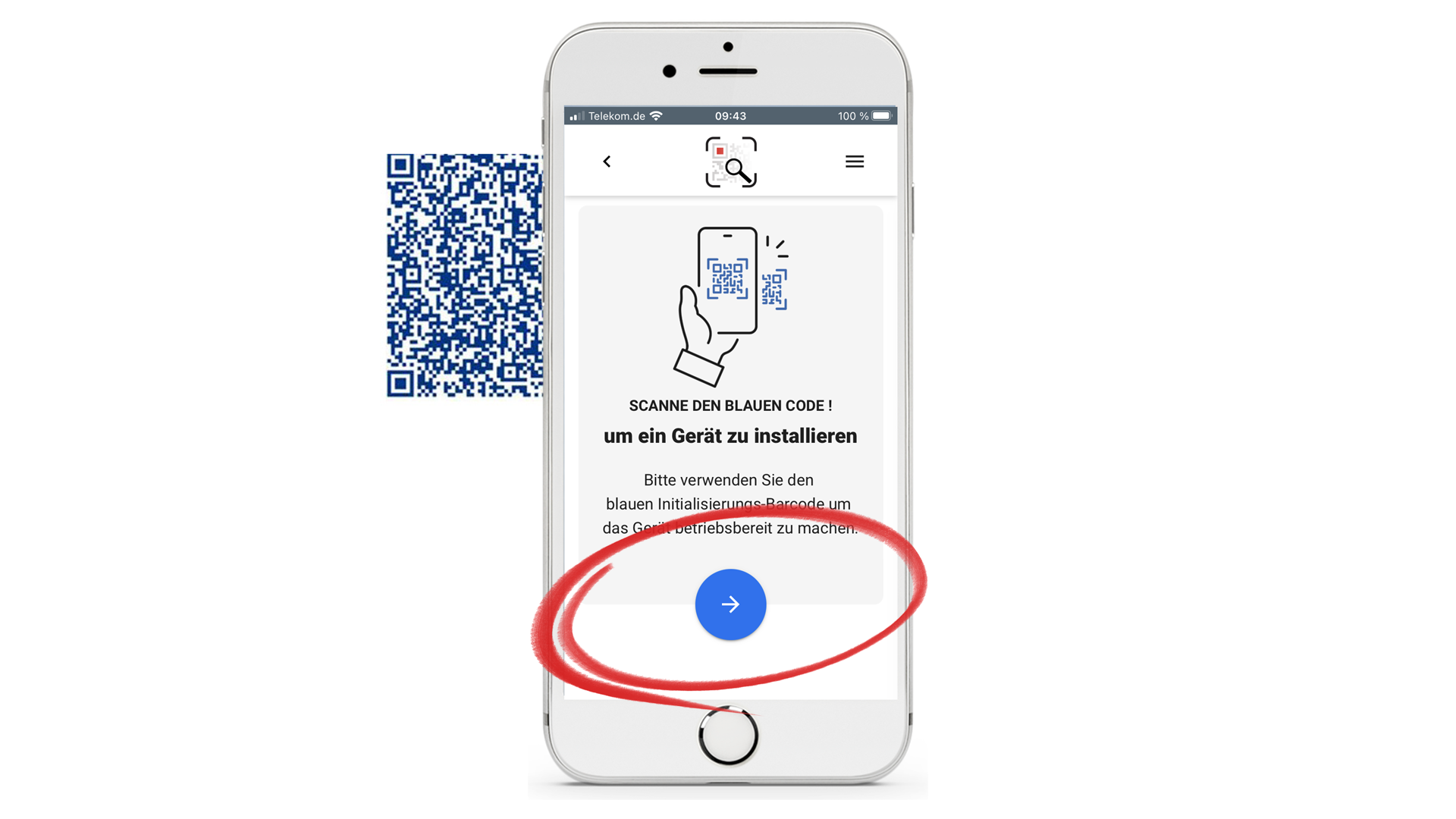
Es erscheint wieder die Aufforderung zur Initialisierung der PWA.
Dazu den blauen Button tippen und den persönlichen „blauen QR-Code“ scannen.
Den blauen QR-Code erhalten Sie von uns mit Ihren persönlichen Anmeldedaten.
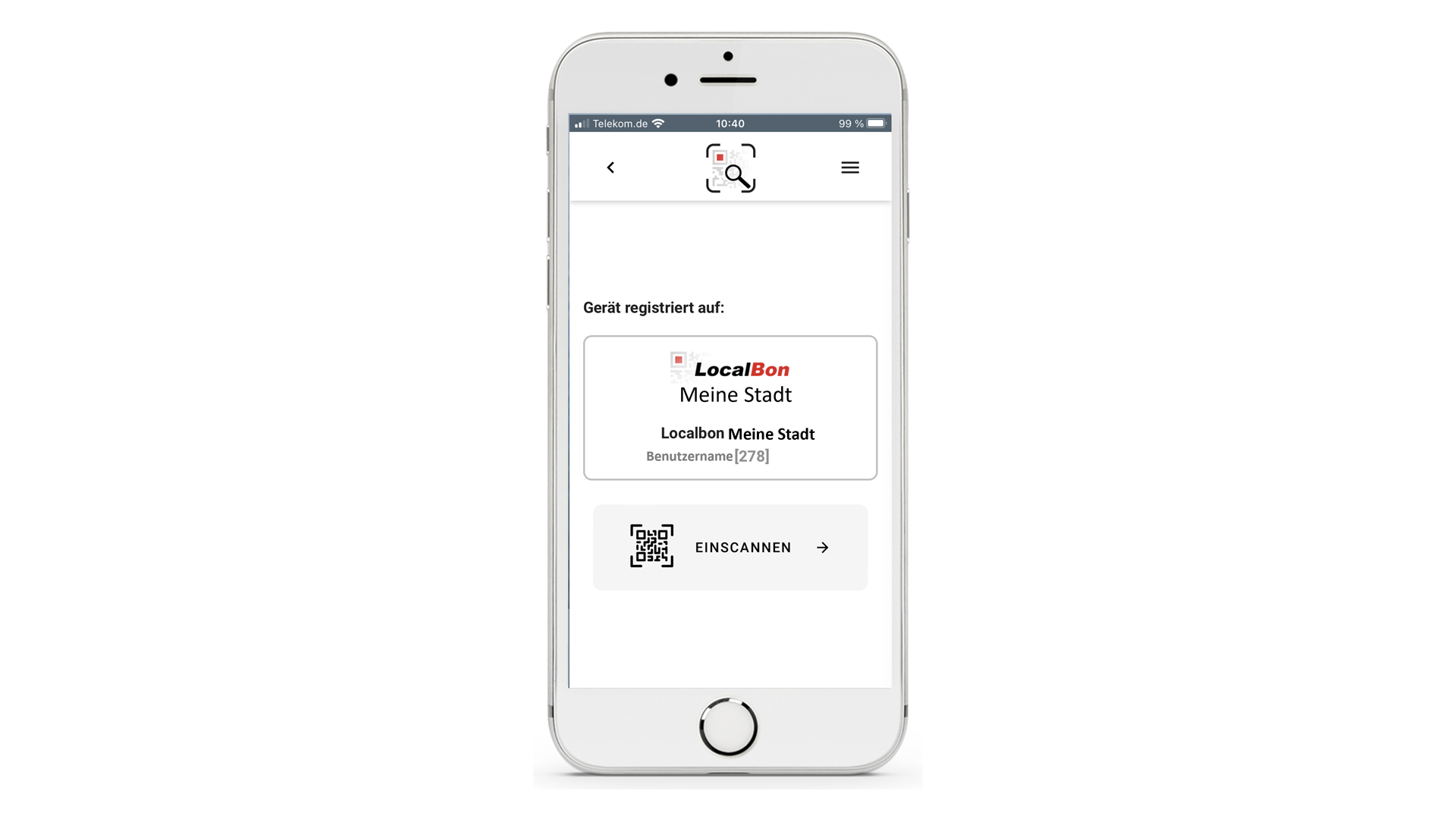
Fertig
Es erscheint der Startbildschirm der Einlöse-App mit der persönlichen Registrierung.
Diese Registrierung bleibt erhalten bis Sie sich abmelden oder ggf. der Browserverlauf gelöscht wird.

Download der Schritt-für-Schritt-Anleitung als PDF zum Ausdrucken.
F&A rund um die Installation der Einlöse-App
Allgemeine Voraussetzungen
Ihr Titel
Your content goes here. Edit or remove this text inline or in the module Content settings. You can also style every aspect of this content in the module Design settings and even apply custom CSS to this text in the module Advanced settings.
Was benötige ich zur Installation der Einlöse-App?
Ein Smartphone oder Tablet mit aktuellem Betriebssystem oder einen PC mit Webcam, eine stabile Internetverbindung sowie Ihre persönlichen Partnershop-Zugangsdaten (blauer QR-Code).
Ihr Titel
Your content goes here. Edit or remove this text inline or in the module Content settings. You can also style every aspect of this content in the module Design settings and even apply custom CSS to this text in the module Advanced settings.
Muss die App aus dem App-Store heruntergeladen werden?
Nein. Die Einlöse-App wird als PWA (Progressive Web App) bereitgestellt und nicht über einen App-Store installiert.
Ihr Titel
Your content goes here. Edit or remove this text inline or in the module Content settings. You can also style every aspect of this content in the module Design settings and even apply custom CSS to this text in the module Advanced settings.
Funktioniert die App mit jedem Browser?
Empfohlen wird:
-
Chrome (Android & Windows)
-
Safari (iPhone)
Andere Browser können Einschränkungen haben.
Ihr Titel
Your content goes here. Edit or remove this text inline or in the module Content settings. You can also style every aspect of this content in the module Design settings and even apply custom CSS to this text in the module Advanced settings.
Funktioniert die Einlöse-App auch am PC?
Ja. Die PWA kann über einen Windows-PC mit Chrome und Webcam installiert und genutzt werden.
Ihr Titel
Your content goes here. Edit or remove this text inline or in the module Content settings. You can also style every aspect of this content in the module Design settings and even apply custom CSS to this text in the module Advanced settings.
Benötige ich dauerhaft Internet?
Ja. Die App funktioniert nicht offline, da jede Transaktion online geprüft wird.
Installation auf dem Smartphone
Ihr Titel
Your content goes here. Edit or remove this text inline or in the module Content settings. You can also style every aspect of this content in the module Design settings and even apply custom CSS to this text in the module Advanced settings.
Die Option „Zum Home-Bildschirm hinzufügen“ wird nicht angezeigt. Was tun?
-
Prüfen Sie, ob Sie Safari (iPhone) oder Chrome (Android) verwenden.
-
Öffnen Sie den Link direkt im Browser, nicht aus einer Messaging-App.
-
Aktualisieren Sie die Seite und versuchen Sie es erneut.
Ihr Titel
Your content goes here. Edit or remove this text inline or in the module Content settings. You can also style every aspect of this content in the module Design settings and even apply custom CSS to this text in the module Advanced settings.
Die App öffnet sich nur im Browser, nicht als eigene App.
-
Die Installation wurde nicht vollständig durchgeführt. Bitte die PWA erneut über „Zum Home-Bildschirm“ installieren.
Ihr Titel
Your content goes here. Edit or remove this text inline or in the module Content settings. You can also style every aspect of this content in the module Design settings and even apply custom CSS to this text in the module Advanced settings.
Ich sehe kein Installations-Pop-up.
Das ist geräteabhängig. Verwenden Sie manuell das Teilen-Menü (iPhone) oder die drei Punkte oben rechts (Android).
Ihr Titel
Your content goes here. Edit or remove this text inline or in the module Content settings. You can also style every aspect of this content in the module Design settings and even apply custom CSS to this text in the module Advanced settings.
Wie installiere ich die Einlöse-App auf einem iPhone?
Scannen Sie den bereitgestellten schwarzen QR-Code in der Anleitung oder öffnen Sie den bereitgestellten Link, tippen Sie auf den Teilen-Button und wählen Sie „Zum Home-Bildschirm“. Anschließend kann die PWA installiert werden.
Ihr Titel
Your content goes here. Edit or remove this text inline or in the module Content settings. You can also style every aspect of this content in the module Design settings and even apply custom CSS to this text in the module Advanced settings.
Wie installiere ich die Einlöse-App auf einem Android-Gerät?
Scannen Sie den schwarzen QR-Code in der Anleitung oder öffnen Sie den Link, tippen Sie oben rechts auf die drei Punkte und wählen Sie „Zum Home-Bildschirm hinzufügen“.
Ihr Titel
Your content goes here. Edit or remove this text inline or in the module Content settings. You can also style every aspect of this content in the module Design settings and even apply custom CSS to this text in the module Advanced settings.
Bei mir erscheint kein Installations-Pop-up. Was kann ich tun?
Je nach Gerät oder Betriebssystem kann die Darstellung abweichen. Nutzen Sie das Browser-Menü („Teilen“ oder Drei-Punkte-Menü“) und wählen Sie manuell „Zum Home-Bildschirm“.
Ihr Titel
Your content goes here. Edit or remove this text inline or in the module Content settings. You can also style every aspect of this content in the module Design settings and even apply custom CSS to this text in the module Advanced settings.
Muss ich die PWA zwingend auf dem Homescreen installieren?
Ja. Die Installation auf dem Homescreen ist erforderlich, bevor die Initialisierung mit dem blauen QR-Code durchgeführt wird. Die zum Einlösen gescannten Gutscheine können sonst nicht korrekt Ihrem Konto zugeordnet und abgerechnet werden.
Ihr Titel
Your content goes here. Edit or remove this text inline or in the module Content settings. You can also style every aspect of this content in the module Design settings and even apply custom CSS to this text in the module Advanced settings.
Nach dem Installieren sehe ich kein App-Icon.
Prüfen Sie:
-
Ob die Installation bestätigt wurde
-
Ob das Icon auf einer anderen Homescreen-Seite liegt
-
Ob ein Neustart des Geräts hilft
Initialisierung & Anmeldung
Ihr Titel
Your content goes here. Edit or remove this text inline or in the module Content settings. You can also style every aspect of this content in the module Design settings and even apply custom CSS to this text in the module Advanced settings.
Was ist der „blaue QR-Code“?
Der blaue QR-Code enthält Ihre individuellen Partnershop-Zugangsdaten (Benutzername und Passwort) zur Anmeldung im Gutscheinsystem.
Ihr Titel
Your content goes here. Edit or remove this text inline or in the module Content settings. You can also style every aspect of this content in the module Design settings and even apply custom CSS to this text in the module Advanced settings.
Der blaue QR-Code lässt sich nicht scannen.
Prüfen Sie:
-
Kamera-Zugriff erlaubt?
-
Ausreichende Beleuchtung?
-
QR-Code unbeschädigt?
-
Bildschirmhelligkeit erhöhen
Ihr Titel
Your content goes here. Edit or remove this text inline or in the module Content settings. You can also style every aspect of this content in the module Design settings and even apply custom CSS to this text in the module Advanced settings.
Die Kamera startet nicht.
Im Browser müssen Kamera-Berechtigungen aktiviert sein:
-
iPhone: Einstellungen → Safari → Kamera
-
Android: Browser-Einstellungen → Website-Berechtigungen
Ihr Titel
Your content goes here. Edit or remove this text inline or in the module Content settings. You can also style every aspect of this content in the module Design settings and even apply custom CSS to this text in the module Advanced settings.
Wann scanne ich den blauen QR-Code?
Nach der Installation der PWA auf dem Homescreen. Erst dann sollte die Initialisierung erfolgen.
Ihr Titel
Your content goes here. Edit or remove this text inline or in the module Content settings. You can also style every aspect of this content in the module Design settings and even apply custom CSS to this text in the module Advanced settings.
Nach dem Scannen passiert nichts.
-
Internetverbindung prüfen
-
Seite neu laden
-
PWA schließen und erneut öffnen
Ihr Titel
Your content goes here. Edit or remove this text inline or in the module Content settings. You can also style every aspect of this content in the module Design settings and even apply custom CSS to this text in the module Advanced settings.
Bleibt meine Anmeldung dauerhaft gespeichert?
Ja. Die Registrierung bleibt erhalten, bis Sie sich aktiv abmelden oder der Browserverlauf gelöscht wird.
Ihr Titel
Your content goes here. Edit or remove this text inline or in the module Content settings. You can also style every aspect of this content in the module Design settings and even apply custom CSS to this text in the module Advanced settings.
Ich habe meine Zugangsdaten verloren. Was soll ich tun?
Wenden Sie sich an Ihren Ansprechpartner im Gutscheinsystem, um neue Zugangsdaten zu erhalten.
Ihr Titel
Your content goes here. Edit or remove this text inline or in the module Content settings. You can also style every aspect of this content in the module Design settings and even apply custom CSS to this text in the module Advanced settings.
Ich bekomme eine Fehlermeldung bei der Anmeldung.
Mögliche Ursachen:
-
Falscher oder beschädigter QR-Code
-
Zugangsdaten nicht aktiv
-
Verbindung zum Server unterbrochen
Bitte ggf. Ihren Ansprechpartner kontaktieren.
Ihr Titel
Your content goes here. Edit or remove this text inline or in the module Content settings. You can also style every aspect of this content in the module Design settings and even apply custom CSS to this text in the module Advanced settings.
Die Anmeldung verschwindet nach einiger Zeit.
Das passiert, wenn:
-
Sie sich in der App abmelden
-
der Browser-Cache gelöscht wird
-
der Browserverlauf gelöscht wird
In diesem Fall muss die Initialisierung erneut durchgeführt werden.
Mehrere Geräte / Scanner
Ihr Titel
Your content goes here. Edit or remove this text inline or in the module Content settings. You can also style every aspect of this content in the module Design settings and even apply custom CSS to this text in the module Advanced settings.
Kann ich in der Einlöse-App mehrere Scanner z.B. für Gutscheine, Kundenkarten etc. nutzen?
Ja, Sie können mehrere Scanner in der Einlöse-App nutzen. Öffnen Sie dazu im Menü der App „Weiteren Scanner hinzufügen“.
Ihr Titel
Your content goes here. Edit or remove this text inline or in the module Content settings. You can also style every aspect of this content in the module Design settings and even apply custom CSS to this text in the module Advanced settings.
Kann ich die Einlöse-App auf mehreren Geräten nutzen?
Ja, Sie können die Einlöse-App auf mehreren Geräten nutzen.
Ihr Titel
Your content goes here. Edit or remove this text inline or in the module Content settings. You can also style every aspect of this content in the module Design settings and even apply custom CSS to this text in the module Advanced settings.
Wie setze ich ein Gerät zurück?
Über das Menü gelangen Sie zu „Gerät zurücksetzen“. Dadurch werden alle Initialisierungen gelöscht.
Ihr Titel
Your content goes here. Edit or remove this text inline or in the module Content settings. You can also style every aspect of this content in the module Design settings and even apply custom CSS to this text in the module Advanced settings.
Wann ist ein Zurücksetzen sinnvoll?
Wenn ein Gerät weitergegeben wird oder eine Neuinitialisierung erforderlich ist.
Ihr Titel
Your content goes here. Edit or remove this text inline or in the module Content settings. You can also style every aspect of this content in the module Design settings and even apply custom CSS to this text in the module Advanced settings.
Ich habe das falsche System initialisiert.
Über „Gerät zurücksetzen“ können alle Anmeldungen gelöscht werden. Danach erneut mit dem korrekten QR-Code initialisieren.
Ihr Titel
Your content goes here. Edit or remove this text inline or in the module Content settings. You can also style every aspect of this content in the module Design settings and even apply custom CSS to this text in the module Advanced settings.
Was passiert beim „Gerät zurücksetzen“?
Alle gespeicherten Anmeldungen werden gelöscht. Eine neue Initialisierung ist erforderlich.
Installation am PC (Windows + Chrome)
Ihr Titel
Your content goes here. Edit or remove this text inline or in the module Content settings. You can also style every aspect of this content in the module Design settings and even apply custom CSS to this text in the module Advanced settings.
Wie installiere ich die PWA auf einem Windows-PC?
Öffnen Sie Chrome, rufen Sie die PWA-Website auf und klicken Sie rechts in der Adressleiste auf „Installieren“.
Ihr Titel
Your content goes here. Edit or remove this text inline or in the module Content settings. You can also style every aspect of this content in the module Design settings and even apply custom CSS to this text in the module Advanced settings.
Welcher Browser wird für die Installation am PC benötigt?
Die Installation wird über Google Chrome empfohlen. Andere Browser unterstützen PWA-Funktionen teilweise nicht vollständig.
Ihr Titel
Your content goes here. Edit or remove this text inline or in the module Content settings. You can also style every aspect of this content in the module Design settings and even apply custom CSS to this text in the module Advanced settings.
Funktioniert die PWA auch mit Microsoft Edge?
In vielen Fällen ja (Chromium-basiert), jedoch wird Chrome empfohlen, um Installationsprobleme zu vermeiden.
Ihr Titel
Your content goes here. Edit or remove this text inline or in the module Content settings. You can also style every aspect of this content in the module Design settings and even apply custom CSS to this text in the module Advanced settings.
Muss Chrome aktuell sein?
Ja. Eine veraltete Version kann dazu führen, dass die Installationsoption nicht angezeigt wird.
Ihr Titel
Your content goes here. Edit or remove this text inline or in the module Content settings. You can also style every aspect of this content in the module Design settings and even apply custom CSS to this text in the module Advanced settings.
Die Installations-Schaltfläche erscheint nicht. Was tun?
-
Chrome aktualisieren
-
Seite neu laden
-
Browser neu starten
-
Cache leeren
Ihr Titel
Your content goes here. Edit or remove this text inline or in the module Content settings. You can also style every aspect of this content in the module Design settings and even apply custom CSS to this text in the module Advanced settings.
Wo finde ich die Installations-Schaltfläche in Chrome?
Nach dem Aufruf der PWA-Website erscheint rechts in der Adressleiste ein Installationssymbol („App installieren“).
Ihr Titel
Your content goes here. Edit or remove this text inline or in the module Content settings. You can also style every aspect of this content in the module Design settings and even apply custom CSS to this text in the module Advanced settings.
Benötige ich Administratorrechte?
Nein. Für die Nutzung der PWA sind keine Administratorrechte erforderlich.
Ihr Titel
Your content goes here. Edit or remove this text inline or in the module Content settings. You can also style every aspect of this content in the module Design settings and even apply custom CSS to this text in the module Advanced settings.
Kann eine Firewall die Nutzung blockieren?
Ja, insbesondere in Unternehmensnetzwerken. In diesem Fall sollte die Domain freigegeben werden.
Ihr Titel
Your content goes here. Edit or remove this text inline or in the module Content settings. You can also style every aspect of this content in the module Design settings and even apply custom CSS to this text in the module Advanced settings.
Benötige ich eine spezielle Software?
Nein. Es wird lediglich der Browser Chrome benötigt.
Ihr Titel
Your content goes here. Edit or remove this text inline or in the module Content settings. You can also style every aspect of this content in the module Design settings and even apply custom CSS to this text in the module Advanced settings.
Die Seite lädt am PC nicht.
-
Internetverbindung prüfen
-
Firewall oder Proxy-Einstellungen kontrollieren
-
IT-Abteilung kontaktieren (falls Firmennetzwerk)
Ihr Titel
Your content goes here. Edit or remove this text inline or in the module Content settings. You can also style every aspect of this content in the module Design settings and even apply custom CSS to this text in the module Advanced settings.
Welche Kamera wird am PC verwendet?
Die angeschlossene Webcam wird für das Scannen der QR-Codes genutzt. Achten Sie bitte darauf, dass die Webcam eine gute Auflösung bietet.
Ihr Titel
Your content goes here. Edit or remove this text inline or in the module Content settings. You can also style every aspect of this content in the module Design settings and even apply custom CSS to this text in the module Advanced settings.
Bei mir erscheint das Icon der App nicht auf dem Homescreen. Was kann ich tun?
Bitte gehen Sie bei der Installation der App genau so vor, wie in der Anleitung beschrieben.
Zuerst den Link zur App in die Browserleite eingeben.
Die App öffnen.
Jetzt in der Browserleiste links den Button „Installation“ drücken.
Fertig. Das Icon der Webapp sollte jetzt auf dem Desktop zu sehen sein.
Ihr Titel
Your content goes here. Edit or remove this text inline or in the module Content settings. You can also style every aspect of this content in the module Design settings and even apply custom CSS to this text in the module Advanced settings.
Kann ich die App auch ohne Installation nutzen?
Ja, grundsätzlich im Browser-Tab – empfohlen wird jedoch die Installation als PWA für eine stabilere Nutzung. Nur so ist sichergestellt, dass gescannte Gutschein Ihrem Konto zugeordnet und abgerechnet werden können.
Ihr Titel
Your content goes here. Edit or remove this text inline or in the module Content settings. You can also style every aspect of this content in the module Design settings and even apply custom CSS to this text in the module Advanced settings.
Wo finde ich die installierte App?
Nach Installation erscheint sie:
-
im Startmenü
-
optional als Desktop-Verknüpfung (Icon)
-
in der Chrome-App-Übersicht
Ihr Titel
Your content goes here. Edit or remove this text inline or in the module Content settings. You can also style every aspect of this content in the module Design settings and even apply custom CSS to this text in the module Advanced settings.
Die Webcam wird nicht erkannt. Was prüfen?
-
Kamera in Windows-Einstellungen aktiviert?
-
Kamera-Zugriff für Desktop-Apps erlaubt?
-
Wird die Kamera von einem anderen Programm blockiert?
Ihr Titel
Your content goes here. Edit or remove this text inline or in the module Content settings. You can also style every aspect of this content in the module Design settings and even apply custom CSS to this text in the module Advanced settings.
Wo aktiviere ich den Kamera-Zugriff in Windows?
Einstellungen → Datenschutz → Kamera → Zugriff für Apps und Desktop-Apps erlauben.
Ihr Titel
Your content goes here. Edit or remove this text inline or in the module Content settings. You can also style every aspect of this content in the module Design settings and even apply custom CSS to this text in the module Advanced settings.
Das Kamerabild ist schwarz oder verzögert.
-
Prüfen Sie Lichtverhältnisse
-
Kamera neu verbinden
-
Chrome neu starten
-
PC neu starten
Ihr Titel
Your content goes here. Edit or remove this text inline or in the module Content settings. You can also style every aspect of this content in the module Design settings and even apply custom CSS to this text in the module Advanced settings.
Mehrere Kameras angeschlossen – wie wähle ich die richtige aus?
Im Browser kann die gewünschte Kamera über die Kamera-Einstellungen ausgewählt werden.
Ihr Titel
Your content goes here. Edit or remove this text inline or in the module Content settings. You can also style every aspect of this content in the module Design settings and even apply custom CSS to this text in the module Advanced settings.
Muss die PWA regelmäßig aktualisiert werden?
Nein, Updates erfolgen automatisch beim erneuten Laden der Anwendung.
Ihr Titel
Your content goes here. Edit or remove this text inline or in the module Content settings. You can also style every aspect of this content in the module Design settings and even apply custom CSS to this text in the module Advanced settings.
Wie erzwinge ich ein Update der PWA?
-
App schließen
-
Chrome neu starten
-
Seite neu laden
Ihr Titel
Your content goes here. Edit or remove this text inline or in the module Content settings. You can also style every aspect of this content in the module Design settings and even apply custom CSS to this text in the module Advanced settings.
Nach einem Windows-Update funktioniert die App nicht mehr.
-
Chrome aktualisieren
-
Cache löschen
-
PWA ggf. neu installieren
Ihr Titel
Your content goes here. Edit or remove this text inline or in the module Content settings. You can also style every aspect of this content in the module Design settings and even apply custom CSS to this text in the module Advanced settings.
Ich möchte die PWA auf einem neuen PC nutzen.
Einfach neu installieren und mit dem blauen QR-Code initialisieren.
Ihr Titel
Your content goes here. Edit or remove this text inline or in the module Content settings. You can also style every aspect of this content in the module Design settings and even apply custom CSS to this text in the module Advanced settings.
Muss ich das alte Gerät vorher zurücksetzen?
Empfohlen, wenn das alte Gerät nicht mehr genutzt wird.
Typische Installationsprobleme
Ihr Titel
Your content goes here. Edit or remove this text inline or in the module Content settings. You can also style every aspect of this content in the module Design settings and even apply custom CSS to this text in the module Advanced settings.
Die PWA lässt sich nicht installieren. Woran kann das liegen?
Mögliche Ursachen sind:
-
Veraltetes Betriebssystem
-
Nicht unterstützter Browser
-
Fehlende Internetverbindung
Ihr Titel
Your content goes here. Edit or remove this text inline or in the module Content settings. You can also style every aspect of this content in the module Design settings and even apply custom CSS to this text in the module Advanced settings.
Die Installations-Schaltfläche erscheint nicht in Chrome.
-
Prüfen Sie, ob Chrome aktuell ist.
-
Aktualisieren Sie die Seite.
-
Klicken Sie in der Adressleiste auf das Installationssymbol.
Ihr Titel
Your content goes here. Edit or remove this text inline or in the module Content settings. You can also style every aspect of this content in the module Design settings and even apply custom CSS to this text in the module Advanced settings.
Die Webcam wird nicht erkannt.
Prüfen Sie die Kamera-Berechtigungen im Browser.
Testen Sie die Webcam in einem anderen Programm.
Schließen Sie andere Programme, die die Kamera blockieren.
Ihr Titel
Your content goes here. Edit or remove this text inline or in the module Content settings. You can also style every aspect of this content in the module Design settings and even apply custom CSS to this text in the module Advanced settings.
Die Kamera funktioniert nicht. Was kann ich tun?
Prüfen Sie, ob der Kamera-Zugriff im Browser erlaubt ist und ob die Kamera von anderen Programmen blockiert wird.
Ihr Titel
Your content goes here. Edit or remove this text inline or in the module Content settings. You can also style every aspect of this content in the module Design settings and even apply custom CSS to this text in the module Advanced settings.
Die Anmeldung funktioniert nicht. Was kann ich prüfen?
-
Wurde die PWA zuvor korrekt auf dem Homescreen installiert?
-
Wurde der richtige blaue QR-Code verwendet?
-
Besteht eine stabile Internetverbindung?
Ihr Titel
Your content goes here. Edit or remove this text inline or in the module Content settings. You can also style every aspect of this content in the module Design settings and even apply custom CSS to this text in the module Advanced settings.
Muss ich ein Benutzerkonto anlegen?
Nein, für die Nutzung ist keine separate Registrierung erforderlich.
Technische Sonderfälle
Ihr Titel
Your content goes here. Edit or remove this text inline or in the module Content settings. You can also style every aspect of this content in the module Design settings and even apply custom CSS to this text in the module Advanced settings.
Die Seite lädt nicht oder bleibt weiß.
-
Internetverbindung prüfen
-
Browser-Cache löschen
-
Browser neu starten
Ihr Titel
Your content goes here. Edit or remove this text inline or in the module Content settings. You can also style every aspect of this content in the module Design settings and even apply custom CSS to this text in the module Advanced settings.
Die PWA reagiert langsam.
-
Andere Browser-Tabs schließen
-
Gerät neu starten
-
WLAN-Verbindung prüfen
Ihr Titel
Your content goes here. Edit or remove this text inline or in the module Content settings. You can also style every aspect of this content in the module Design settings and even apply custom CSS to this text in the module Advanced settings.
Nach einem Update funktioniert die App nicht mehr.
-
PWA schließen
-
Browser neu starten
-
Falls nötig: Gerät zurücksetzen und neu initialisieren
Ihr Titel
Your content goes here. Edit or remove this text inline or in the module Content settings. You can also style every aspect of this content in the module Design settings and even apply custom CSS to this text in the module Advanced settings.
Die App funktioniert nach einem Systemupdate nicht.
-
Browser aktualisieren
-
PWA neu installieren
-
Cache leeren
Sicherheit & Zugang
Ihr Titel
Your content goes here. Edit or remove this text inline or in the module Content settings. You can also style every aspect of this content in the module Design settings and even apply custom CSS to this text in the module Advanced settings.
Sind meine Zugangsdaten sicher?
Die Anmeldung erfolgt über individuelle Zugangsdaten. Diese sollten nicht weitergegeben werden.
Ihr Titel
Your content goes here. Edit or remove this text inline or in the module Content settings. You can also style every aspect of this content in the module Design settings and even apply custom CSS to this text in the module Advanced settings.
Was tun bei Verlust des blauen QR-Codes?
Bitte wenden Sie sich an den zuständigen Ansprechpartner zur Ausstellung neuer Zugangsdaten.
Weitere Anleitungen für Händler
Im Händlerbereich finden Sie weitere Anleitungen zur Nutzung des Gutscheinsystems.
Web-Oberfläche installieren und einrichten
So richten Sie den Zugang zur Web-Oberfläche auf Ihrem Smartphone, Tablet oder Windows-PC ein.
→ Zur Anleitung „Web-Oberfläche installieren“
Gutscheine über die Web-Oberfläche einlösen
So lösen Sie Gutscheine direkt im Browser ein, scannen QR-Codes oder geben Gutschein-Codes manuell ein.
→ Zur Anleitung „Gutscheine über die Web-Oberfläche einlösen“
Gutscheine mit der Einlöse-App einlösen
So scannen Sie Gutscheine mit der App und lösen diese direkt an der Kasse ein.
→ Zur Anleitung „Gutscheine mit der Einlöse-App einlösen“
Zur Übersicht aller Händler-Anleitungen
Alle Anleitungen und Hilfethemen für Händler finden Sie gesammelt auf der Übersichtsseite des Support-Hubs.
→ Zur Seite „Support für Händler“
Die Inhalte dieser Seiten werden regelmäßig aktualisiert und orientieren sich an typischen Nutzungssituationen.